






推しアイデア
テキーラベルアプリの姉妹アプリ! シャンパンを誰かに奢らせたい時に使おう!
テキーラベルアプリの姉妹アプリ! シャンパンを誰かに奢らせたい時に使おう!
にんにんLTをゲームバーSAVEで開催することになったので、関連するアプリを作るに至った。
- AudioToolboxを利用したバイブレーション - 泡のアニメーション - Liquid Glass UI の実装 - enumによる音声モデルの管理
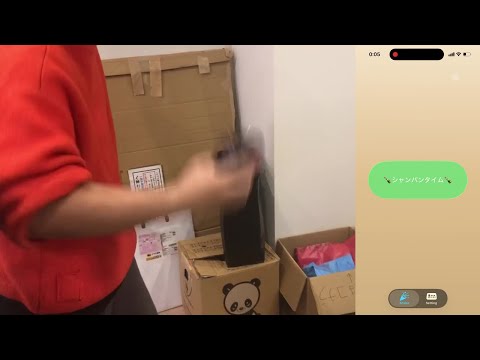
スマホを振るとバイブレーションが起こります。 また、振ると泡のアニメーションが発生します。 閾値内の乱数の数値分スマホを振ると泡が大量発生し、特定の音声が再生されます。
Setting画面で以下の項目を調整できます。 ・乱数の範囲 ・シャンパングレード (現在は振る時の画面に数値が表示されるのみ) ・再生する効果音の種類
・Swift (6.2.3) ・Xcode (26.2) ・MacOS Tahoe (26.2)
VibrationManager.swiftimport AudioToolbox final class VibrationManager: ObservableObject { @Published var isActiveVibration = false private var vibrationTimer: Timer? func startActiveVibration() { isActiveVibration = true vibrationTimer = Timer.scheduledTimer(withTimeInterval: 0.1, repeats: true) { _ in if self.isActiveVibration { AudioServicesPlaySystemSound(kSystemSoundID_Vibrate) } else { self.vibrationTimer?.invalidate() self.vibrationTimer = nil } } } func stopVibration() { isActiveVibration = false } }
MotionManager.swiftimport Foundation
import CoreMotion

final class MotionManager: ObservableObject {

    @Published var isStarted = false

    @Published var xStr = "0.0"
    @Published var yStr = "0.0"
    @Published var zStr = "0.0"
    @Published var xStrNum = 0.0
    @Published var yStrNum = 0.0
    @Published var zStrNum = 0.0

    @Published var shakeCount:Int = 0

    //乱数用
    @Published var randomNumber:Int = 100
    //泡用
    @Published var spawnRate: Double = 35

    let motionManager = CMMotionManager()
    let vibrationManager = VibrationManager()
    let ponPlayer: PonPlayer

    init(ponPlayer: PonPlayer) {
        self.ponPlayer = ponPlayer
    }

    func start() {
        if motionManager.isDeviceMotionAvailable {
            motionManager.deviceMotionUpdateInterval = 0.5

            motionManager.startDeviceMotionUpdates(to: OperationQueue.current!, withHandler: {(motion:CMDeviceMotion?, error:Error?) in
                    self.updateMotionData(deviceMotion: motion!)
                })
        }
        isStarted = true
    }

    func stop() {
        isStarted = false
        motionManager.stopDeviceMotionUpdates()
    }

    private func updateMotionData(deviceMotion:CMDeviceMotion) {
        xStr = String(deviceMotion.userAcceleration.x)
        yStr = String(deviceMotion.userAcceleration.y)
        zStr = String(deviceMotion.userAcceleration.z)

        xStrNum = abs(deviceMotion.userAcceleration.x)
        yStrNum = abs(deviceMotion.userAcceleration.y)
        zStrNum = abs(deviceMotion.userAcceleration.z)

        let power = max(xStrNum, yStrNum, zStrNum)

        //振っている時
        if power > 1.0 {

            shakeCount += 1

            //泡のパワーを上げる
            spawnRate = min(100, spawnRate + power * 2)
            print("spawnRate:",spawnRate)

            //一定数に到達したら音声出力
            if (shakeCount >= randomNumber) {
                vibrationManager.stopVibration()
                ponPlayer.musicPlay()
                spawnRate = 300
            } else {
                //バイブレーションスタート
                vibrationManager.startActiveVibration()
            }
        } else {
            //振っていない時
            //徐々に戻す
            spawnRate = max(35, spawnRate - 2)
            //バイブレーションを止める
            vibrationManager.stopVibration()
        }
    }
}
AI君が頑張りました。
BubbleView.swiftimport SwiftUI struct BubbleView: View { @State private var bubbles: [BubbleModel] = [] @State private var lastTime: Date? @State private var lastSize: CGSize = .zero @EnvironmentObject private var motionManager: MotionManager var body: some View { TimelineView(.animation) { timeline in let date = timeline.date GeometryReader { geo in Canvas { context, _ in draw(context: context) } .onAppear { lastSize = geo.size } .onChange(of: geo.size) { lastSize = geo.size } } .onChange(of: date) { updateBubbles( date: date, size: lastSize ) } .onChange(of: motionManager.shakeCount) { updateBubbles( date: Date(), size: lastSize ) } .ignoresSafeArea() .allowsHitTesting(false) } } private func draw(context: GraphicsContext) { for bubble in bubbles { let rect = CGRect( x: bubble.x - bubble.radius, y: bubble.y - bubble.radius, width: bubble.radius * 2, height: bubble.radius * 2 ) context.fill( Path(ellipseIn: rect), with: .color(.white.opacity(0.25)) ) } } private func updateBubbles(date: Date, size: CGSize) { let dt = lastTime.map { date.timeIntervalSince($0) } ?? 0 lastTime = date for i in bubbles.indices { let floatBoost = max(0, (size.height - bubbles[i].y) / size.height) bubbles[i].y -= (bubbles[i].speed + floatBoost * 40) * dt bubbles[i].x += sin(CGFloat(date.timeIntervalSince1970) + bubbles[i].phase) * 0.4 } bubbles.removeAll { $0.y + $0.radius < 0 } var count = Int(abs(motionManager.spawnRate * dt)) let bottomBand: CGFloat = 40 if count > 5 { count = 5 } for _ in 0..<count { bubbles.append( BubbleModel( x: .random(in: 0...size.width), y: size.height + CGFloat.random(in: 0...bottomBand), radius: .random(in: 10...20), speed: .random(in: 40...400), phase: .random(in: 0...(.pi * 2)) ) ) } } }
ついでに加速度センサー起動のViewも併せて
ShakeView.swiftimport SwiftUI struct ShakeView: View { @State var isOnButton: Bool = true @EnvironmentObject private var motionManager: MotionManager @EnvironmentObject private var setting: GameSetting @ObservedObject private var vibrationManager = VibrationManager() var body: some View { VStack { if (isOnButton){ Button (action: { isOnButton.toggle() //乱数生成 if Int(setting.valL) == Int(setting.valH) { motionManager.randomNumber = Int(setting.valL) } else { motionManager.randomNumber = Int.random(in: setting.valL..<setting.valH) } //加速度センター起動 motionManager.start() },label: { Text("🍾シャンパンタイム🍾") .font(.title2) .frame(minWidth: 180, minHeight: 60) .padding(.horizontal, 48) .padding(.vertical, 30) .foregroundStyle(.white) }) .glassEffect(.clear.tint(.green.opacity(0.7)).interactive()) } else { VStack(spacing: 30.0) { Button (action: { isOnButton.toggle() //Countリセット motionManager.shakeCount = 0 //加速度センター停止 motionManager.stop() motionManager.spawnRate = 35 }, label: { VStack{ Text("🪇シェイク!シェイク!🪇") .font(.title2) .foregroundStyle(.white) Text("シャンパングレード: \(Int(setting.sliderValue * 10))") .font(.title2) .foregroundStyle(.white) } .frame(width: 240, height: 30) .padding(.horizontal, 48) .padding(.vertical, 30) }) .glassEffect(.clear.tint(.indigo.opacity(0.7)).interactive()) Button (action: { isOnButton.toggle() //Countリセット motionManager.shakeCount = 0 //加速度センター停止 motionManager.stop() motionManager.spawnRate = 35 }, label: { Text("✋STOP!✋") .font(.title2) .frame(width: 240, height: 30) .padding(.horizontal, 48) .padding(.vertical, 30) .foregroundStyle(.white) }) .glassEffect(.clear.tint(.pink.opacity(0.5)).interactive()) .offset(x: 0.0, y: -20.0) } //GlassEffectContainerButton GlassEffectContainer(spacing: 30) { HStack() { Button (action: { isOnButton.toggle() //Countリセット motionManager.shakeCount = 0 //加速度センター停止 motionManager.stop() motionManager.spawnRate = 35 }, label: { Text("🪇") .font(.title2) .padding(.horizontal, 30) .padding(.vertical, 30) .foregroundStyle(.white) }) .glassEffect(.clear.interactive()) Button (action: { isOnButton.toggle() //Countリセット motionManager.shakeCount = 0 //加速度センター停止 motionManager.stop() motionManager.spawnRate = 35 }, label: { Text("✋") .font(.title2) .padding(.horizontal, 30) .padding(.vertical, 30) .foregroundStyle(.white) }) .glassEffect(.clear.interactive()) } } } } .padding() } }
2つつまみがあるスライダはSwiftUIではまだ実装できないっぽい。 UIKitでの実装ならできるらしい。 これだけのためにSwiftUIとUIKitを共存させるのはなんか違うなと思ってやめた。 ので2つつまみのスライダは自作。
SettingView.swiftimport SwiftUI

let windowSize = UIApplication.shared.connectedScenes.first as? UIWindowScene
let totalWidth = windowSize!.screen.bounds.width - 100

struct SettingView: View {

    @EnvironmentObject private var setting: GameSetting

    @State var widthL: CGFloat = 0
    @State var widthH: CGFloat = totalWidth - 72

    var body: some View {
        ZStack {
            LinearGradient(
                gradient: Gradient(colors: [.purple, .blue, .pink]),
                startPoint: .topLeading,
                endPoint: .bottomTrailing
            )
            .ignoresSafeArea()

            VStack {
                Text("範囲")
                    .font(.title2)
                Text("\(String(setting.valL)) 〜 \(String(setting.valH))")
                    .font(.headline)
                SliderIntoItem(valL: $setting.valL, valH: $setting.valH, widthL: $widthL, widthH: $widthH)
                    .padding(.bottom, 48)
                Text("シャンパングレード")
                    .font(.title2)
                Text("\(String(Int(setting.sliderValue * 10)))")
                    .font(.headline)
                Slider(value: $setting.sliderValue)
                    .tint(.mint)
                    .padding(.bottom, 48)
                Text("効果音")
                    .font(.title2)
                Picker("効果音", selection: $setting.selectedSound) {
                    ForEach(PlayerModel.allCases) { sound in
                        Text(sound.displayName)
                            .tag(sound)
                            .frame(width: 32)
                            .fontWeight(.bold)
                    }
                }
                .pickerStyle(.menu)
                .tint(.yellow)

            }
            .padding(48)
        }
    }

}

struct SliderIntoItem: View {
    @Binding var valL: Int
    @Binding var valH: Int

    @Binding var widthL: CGFloat
    @Binding var widthH: CGFloat

    var body: some View {
        ZStack(alignment: .leading) {
            Rectangle()
                .fill(Color.orange.opacity(0.2))
                .frame(height: 6)
            Rectangle()
                .fill(Color.orange)
                .frame(width: self.widthH - self.widthL, height: 6)
                .offset(x: self.widthL + 18)
            HStack(spacing: 0) {
                Circle()
                    .fill(Color.orange)
                    .frame(width: 18, height: 18)
                    .offset(x: self.widthL)
                    .gesture(
                        DragGesture()
                            .onChanged({(value) in
                                if value.location.x >= 1 && value.location.x <= self.widthH {
                                    self.widthL = value.location.x
                                    self.valL = self.getValue(val: self.widthL / (totalWidth - 72))
                                }
                            })
                    )
                Circle()
                    .fill(Color.orange)
                    .frame(width: 18, height: 18)
                    .offset(x: self.widthH)
                    .gesture(
                        DragGesture()
                            .onChanged({(value) in
                                if value.location.x <= totalWidth - 72 && value.location.x >= self.widthL {
                                    self.widthH = value.location.x
                                    self.valH = self.getValue(val: (self.widthH / (totalWidth - 72)))
                                }
                            })
                    )
            }
        }
        .frame(width: totalWidth - 36)
    }

    func getValue(val: CGFloat) -> Int {
        let result = Double(val) * 100
        return Int(round(result))
    }
}
管理しやすい。便利。
PlayerModel.swiftenum PlayerModel: String, CaseIterable, Identifiable { case normal case tequila case premium case secret var id: String { rawValue } var assetName: String { switch self { case .normal: return "pon" case .tequila: return "tequila" case .premium: return "pon_premium" case .secret: return "tequila_secret" } } var displayName: String { switch self { case .normal: return "ノーマル" case .tequila: return "いつもの" case .premium: return "プレミアム" case .secret: return "シークレット" } } }
https://zenn.dev/oka_yuuji/articles/421132da5a06bb https://qiita.com/REON/items/5812fc12ba50c91b8d9e
https://zenn.dev/kamomekun/scraps/8da5b289719d2a
https://zenn.dev/haludoll/articles/abceed4fd12bfe https://www.rough-and-ready.co.jp/n/n8503685dfc78
https://dough.tokyo/archives/308
・リリース! ・SwiftUI に Liquid Glass UI が浸透してきたら諸々アプデしたい ・遊べる機能をもっと増やしても良さそう